
EmailHeatmaps and Klaviyo integration is live!
What is EmailHeatmaps?
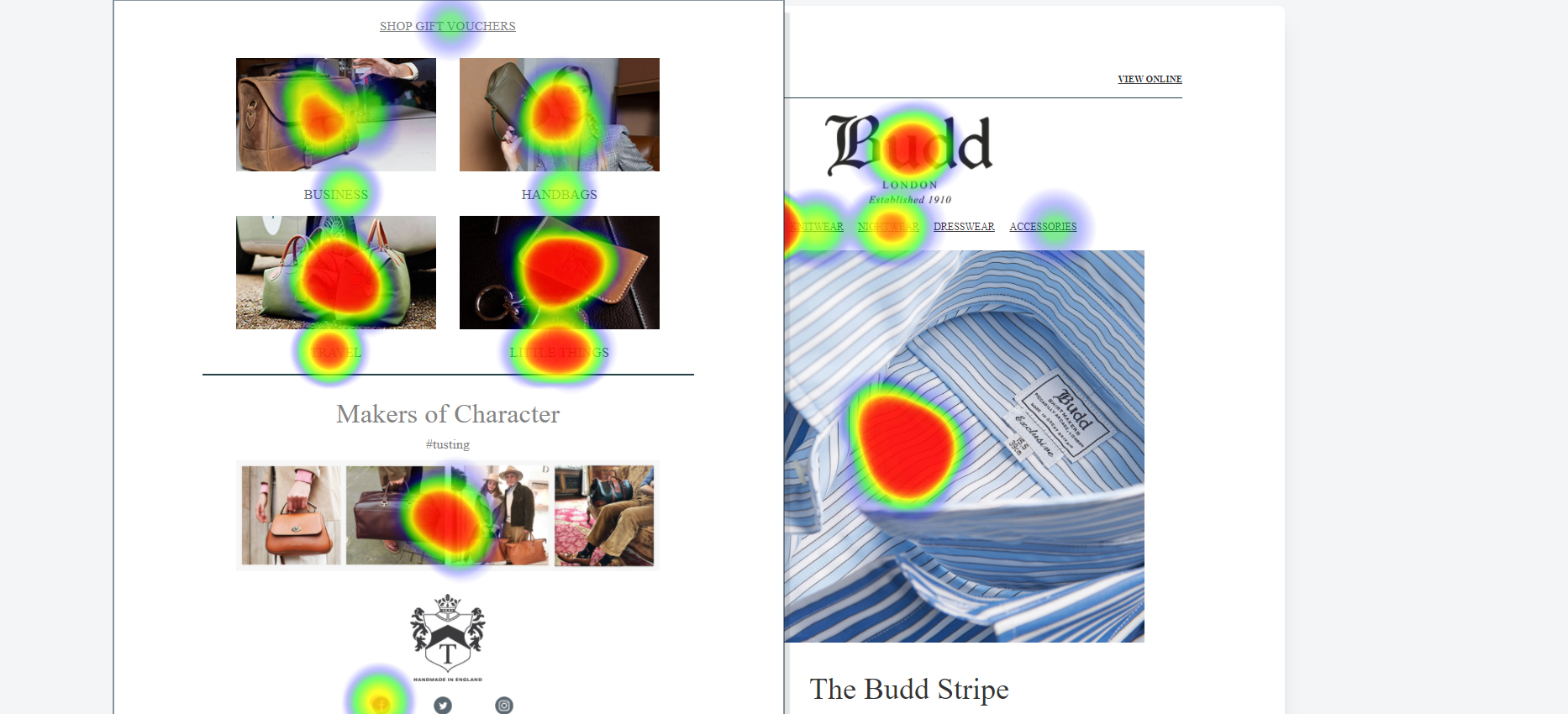
EmailHeatmaps unique tool helps you create visual reports to easily see the results from all your email marketing campaigns.
With our easy 1-step setup process, you can analyse the results of all your email marketing campaigns and truly understand which clicks are hot, which clicks are not, the areas that get the most clicks and those that don't.
Simply connect your Klaviyo account via our secure OAuth integration and we do the magic! EmailHeatmaps is safe, secure and never connects to your mailing list or subscribers.
We are the only direct integration tool that can report on ALL sent email campaigns to create EmailHeatmaps that you have ever sent.
See how it works:
Comparison tool
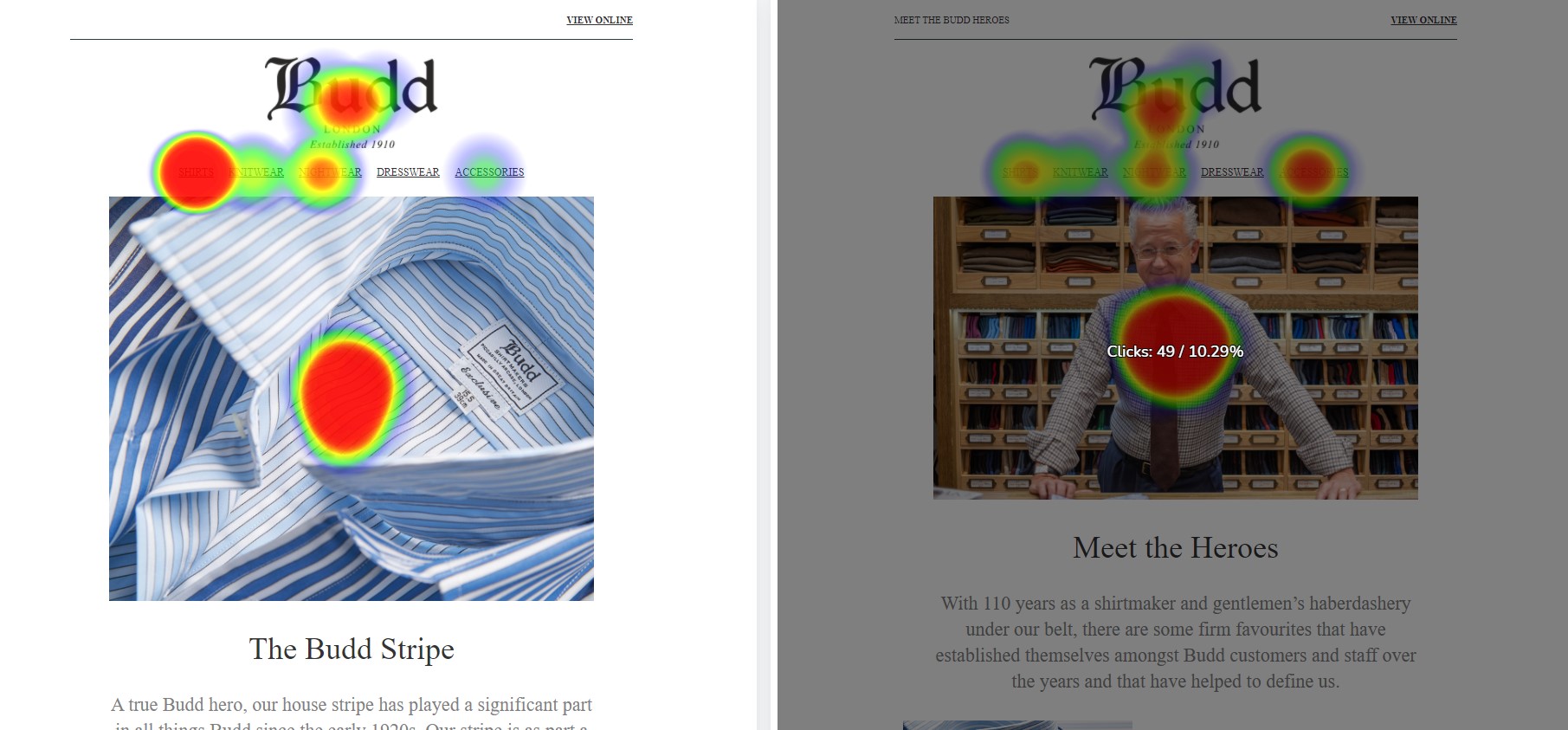
With our amazing one-of-a-kind campaign compare tool, you can compare two campaigns side-by-side.
Why do this?
Simple! Maybe you've changed your template, updated the design, introduced product instead of lifestyle shots, animated gifs over JPG/PNG, or changed your 'call to action'. Whatever it is, comparing and analysing is critical to improving your email results. See what worked and what didn't so you can create a more effective campaign the next time around.
How to setup integration
Once you have started your free trial, follow these simple steps to setup integration with your Klaviyo account using our secure OAuth connection.
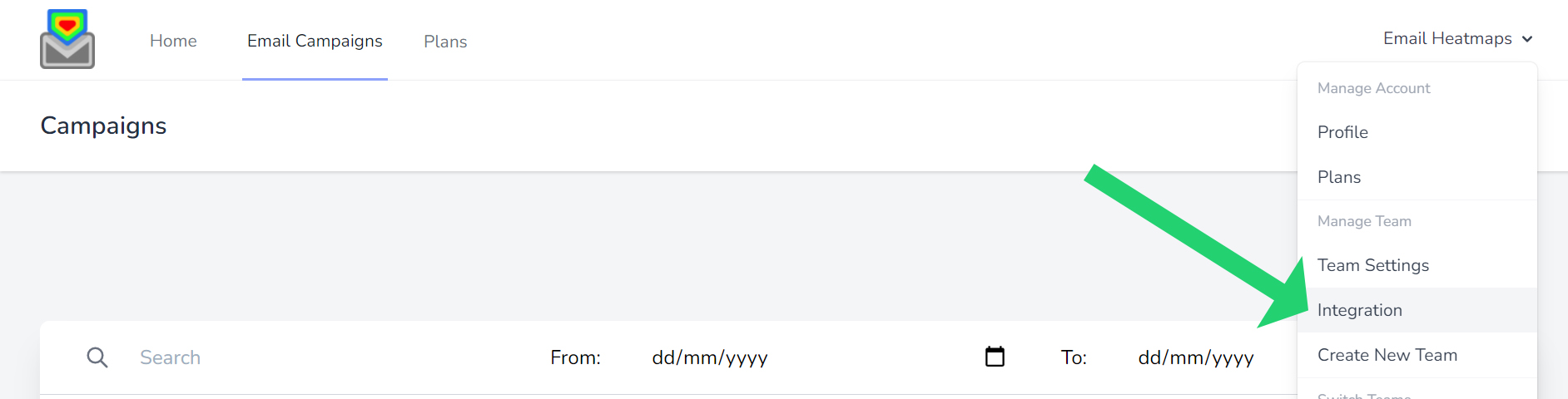
Login and click your name top right, then select "Integration"
Find the Klaviyo section and click "Click here to connect Klaviyo" - this will start the secure OAuth authorization process.
You'll be redirected to Klaviyo's secure authorization page. Review the requested permissions and click "Allow" to authorize EmailHeatmaps access to your account.
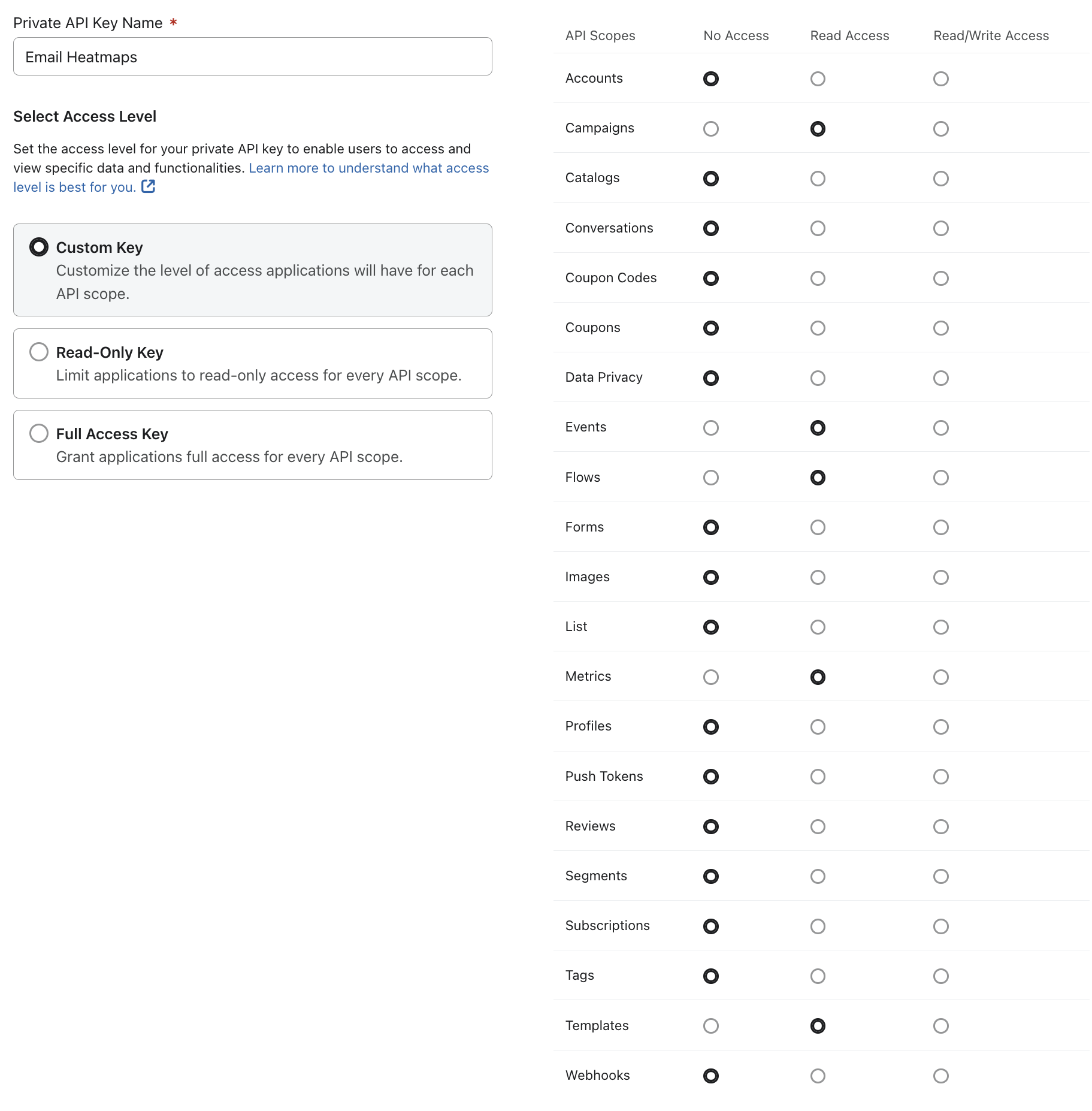
Required Permissions:
• Accounts (Read) - To verify your account connection
• Campaigns (Read) - To access your email campaigns and performance data
• Templates (Read) - To retrieve email templates for heatmap generation
• Lists (Read) - To understand campaign targeting
• Metrics (Read) - To access click and engagement data
• Flows (Read) - To generate heatmaps for automation sequences
• Events (Read) - To track click events for heatmap visualization
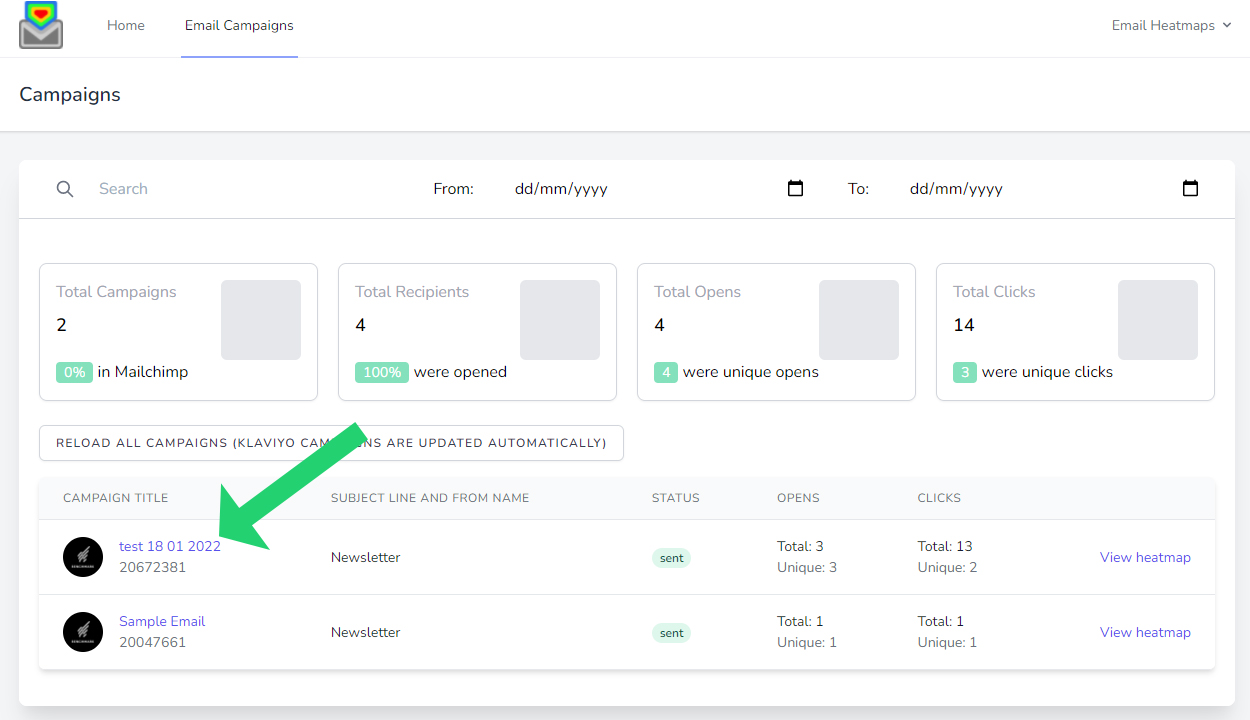
Once connected, EmailHeatmaps will automatically import your campaigns. Depending on how many campaigns are in your account, you can find all your campaigns by clicking "Email Campaigns" in the menu bar.
You will need to choose the correct plan to display the total email campaigns in your account.

Then all your campaigns will display here:
Data Usage & Privacy
What Data We Access
EmailHeatmaps only accesses the following data from your Klaviyo account:
- Campaign metadata (subject lines, send dates, recipient counts)
- Email templates and content (to overlay heatmap data)
- Click event data (URLs clicked and click counts)
- Automation flow structure (to map workflow performance)
What We DON'T Access
- Subscriber personal information (names, email addresses, personal data)
- Email lists or subscriber details
- Account billing information
- Any data modification capabilities (read-only access only)
Data Security
- OAuth 2.0 encryption for all data transfers
- Secure token management with automatic refresh
- No storage of personal subscriber data
- SOC 2 compliant infrastructure
Features & How to Use
Viewing Campaign Heatmaps
- Navigate to "Email Campaigns" from the main menu
- Select any campaign from your list
- View the heatmap - Red areas indicate high click activity, blue areas show lower engagement
Comparing Campaigns
- Select two campaigns you want to compare
- Use the comparison tool to view them side-by-side
- Analyze differences in click patterns and engagement
Automation Workflows
- Access "Automations" from the menu
- Select a flow to see individual message performance
- View heatmaps for each email in your automation sequence
Troubleshooting
Connection Issues
Problem: "Authorization was declined" message Solution: Click "Allow" on the Klaviyo authorization page to grant necessary permissions
Problem: No campaigns appearing Solution: Ensure your Klaviyo account has sent campaigns and wait 5-10 minutes for initial sync
Problem: Missing heatmap data Solution: Check that campaigns have click activity - campaigns without clicks won't generate heatmaps
Permission Errors
If you see permission-related errors:
- Disconnect and reconnect your integration
- Ensure all required scopes are granted during authorization
- Contact support if issues persist
Performance Issues
- Large accounts may take longer to sync initially
- Real-time updates typically appear within 15 minutes
- Historical data processes automatically in the background
Disconnecting Your Integration
To disconnect Klaviyo from EmailHeatmaps:
- Go to Integration settings in EmailHeatmaps
- Click "Disconnect your account" in the Klaviyo section
-
Confirm disconnection - This will:
- Revoke access tokens securely
- Remove the app from your Klaviyo integrations
- Stop all data synchronization
You can reconnect at any time by following the setup process again.
Frequently Asked Questions
Q: How long does it take to see heatmaps after sending a campaign? A: Heatmaps typically appear within 15-30 minutes after your campaign is sent.
Q: Can I see heatmaps for old campaigns? A: Yes! EmailHeatmaps can process historical campaigns from your entire Klaviyo account history.
Q: Will this affect my Klaviyo account performance? A: No, our integration uses read-only access and doesn't impact your Klaviyo functionality.
Q: What happens if I change my Klaviyo password? A: OAuth connections remain active even if you change your password, as they use secure tokens.
Q: Can I use this with multiple Klaviyo accounts? A: You can connect one Klaviyo account per EmailHeatmaps account. Contact us for multi-account solutions.
This integration guide covers OAuth 2.0 connection, data usage transparency, and comprehensive setup instructions as required for Klaviyo App Marketplace approval.
What our clients think:

Email heatmaps has really helped us improve the content of our emails and in turn increase click through rates!
Budd shirts

A great way to visualise how each campaign performs in order for us to make decisions to keep improving
TUSTING

The compare tool is so valuable to help us improve the content of our emails!
Sterling and Burke

A great tool for us to keep improving our email marketing campaigns! Looking forward to seeing new features like download and share.
Ally Capellino

Truly amazing and the ease to create email heatmaps really helps. The compare tool really powerful to understand the impact of changes to design and layout.
Chikas

I've never seen anything like Email Heatmaps! I love that you're able to use this on older emails and as soon as I got set up, I was able to see things that people had been clicking in our emails that really opened my eyes. This is going to change how I do email marketing!
Focus Performance
Start your free 14-day today!
Registered Office: 153 Mortimer Street, Herne Bay, Kent, England, CT6 5HA